Normal View of Address Bar
View of Address Bar with URL selected
Keyboard Shortcuts
Press F11 key for full screen view (Internet Explorer)
See "Printing Tip" below
|
To do this |
Use this combination of keys pressed together |
|
Select All |
Ctrl + A |
|
Copy |
Ctrl + C |
|
Cut |
Ctrl + X |
|
Paste |
Ctrl + V |
|
Delete |
Ctrl + D or just select item and press Delete key |
|
Undo |
Ctrl + Z |
|
|
Ctrl + P |
|
Open the "Close Program" window (Program Manager) |
Ctrl + Alt + Delete |
|
Manage Multiple Windows |
Alt + Tab (Press and hold Alt key, press and release Tab key. Press Tab key to scroll) |
|
Display the Start Menu |
Ctrl + Esc (Escape key) |
|
Open Windows Explorer |
Windows key + E |
|
Minimize all windows to see the Desktop |
Windows key + D |
|
Open the "My Computer" to "System Properties" |
Windows key + Break (Pause Break key) |
|
Find "All Files" |
Ctrl + F |
|
Internet Explorer |
|
|
Ctrl + Enter |
Add "www." to the beginning and ".com" to the end of the text typed in the Address bar. |
|
Enter |
Searches for word(s) entered into the Address Bar |
|
F11 Key |
Toggles between "Full Screen" view and regular view. |
|
Ctrl + F |
Opens the "Find on this page" dialog box |
|
Esc (Escape) |
Stops downloading a page, or stops "Background Sound" |
|
Alt + D |
Selects the text in the Address bar. (useful for copying the "URL"). After pressing Alt + D, then press Ctrl + C and the address will be copied. |
|
|
|
|
Normal View of Address Bar |
View of Address Bar with URL selected |
|
Dwight R. Blackburn 6551 Teshlar Drive. Anchorage, AK 99507 (907) 344-4764 |
|
|
Click File/Print Preview to see how it will look. (This is in Internet Explorer 5.5 and higher and Netscape Navigator).
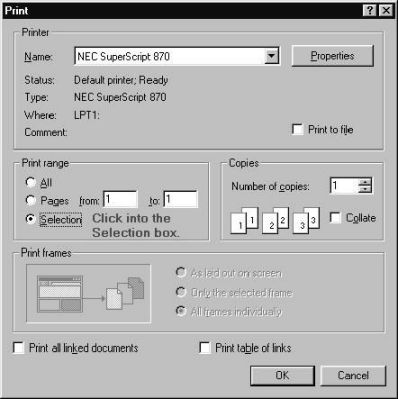
If you want to print only the "Keyboard Shortcuts" portion of the page, select the table portion of the page then:
1. Click the File drop down menu
2. Select "Print".
3. The print window will open.
4. Look at the left center area of the window for the "Selection" option and click it. (See picture below)
5. Then you can click the "OK" button and the printer will only print the Keyboard Shortcut portion.
Note: If the "Select" option is "grayed out" or unusable, it means you have not selected anything on the page and will need to click "Cancel" on the print window and go back and highlight the area you wish to print.
You can choose to print only the page(s) that you want.
|
Do you find this information helpful? Can you give me any suggestions or comments that will make this kind page better or easier for you to use? Let me know. Email Dwight Blackburn |
|
How to disable background applications in both Win95 and Win 98 |
How to block porno and other unwanted email messages in Outlook Express |
This page last updated: November 26, 2002