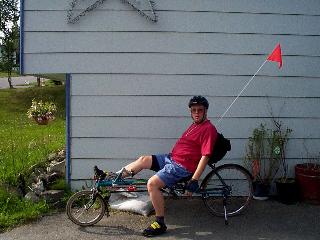
 Original Photo: This is the
original photo. I am partially in a shadow. My face is too dark. The
background is too sharp and distracting.
Original Photo: This is the
original photo. I am partially in a shadow. My face is too dark. The
background is too sharp and distracting. Digital Photography
"Digital Magic"
The Cameras:
I have used a Kodak DC-120 Camera, and an Olympus D-600L Camera. Both of these cameras provide pictures at the 1.4 meg pixel range. Both of these cameras are at the high end of the affordable digital cameras. You can currently purchase the Kodak for $799, and the Olympus for $1,299. Good old fashion film is far superior in resolution to digital cameras, especially those within a reasonable or somewhat beyond price range. (Below $10,000).If you're looking for inexpensive but high quality digital photography, I recommend that you use a good camera with standard film. Then scan the pictures using a flatbed scanner. Good cameras can cost as little as $100, and any scanner that has 300 x 300 dpi optical quality provides excellent digital images from the snapshots created by standard film. These images are better than images from digital cameras. Digital cameras are excellent where low-resolution images are acceptable. The "mega-pixel" cameras such as those that I use provide an acceptable image to about an 8x10 enlargement with very little cropping.
The Software: Software is my virtual darkroom. I use several software products.Photoshop: This is the best photo retouching software on the market.
Thumbs Plus: This is a shareware product. I use it to view graphics on my computer, convert image formats, crop pictures, make overall adjustments in picture quality, (brightness, contrast and color correction). Finally, I use this software for most of my photo printing. This software is worth many times the price of its registration fees. Check it out at www.cerious.com. Picture It: This software has some very powerful edge finding tools. It lets you cut out a section of one photo and include it into another. For instance, I can move a person to a different background. Photo Soap: This is inexpensive software that does a lot. While it is not quite as powerful as photoshop, it is very very good. Photoshop is aimed at the professional graphics artists market. Photo Soap is aimed at the ammeter market. The tools available in Photo Soap are easy to use and the effects outstanding. I call this the poor-man's Photoshop. Even though I have Photoshop, I still use Photo Soap because of the ease of use of some of it's tools. Power Goo: This is an unusual product that allows you to distort images. It's a great toy and fun to play with. And it sometimes has significant use. I used it to provide the "virtual tummy tuck" as explained below in the "Digital Magic" section.The Pictures on the Web:
The pictures presented on the web have had their resolution reduced to about 320 x 200 pixels. They are saved in jpeg format using 75% picture quality. I use this combination to give acceptable pictures that can download relatively fast. Most of the picture files are less than 20K bytes.
Digital Magic:
Original Photo: This is the
original photo. I am partially in a shadow. My face is too dark. The
background is too sharp and distracting.
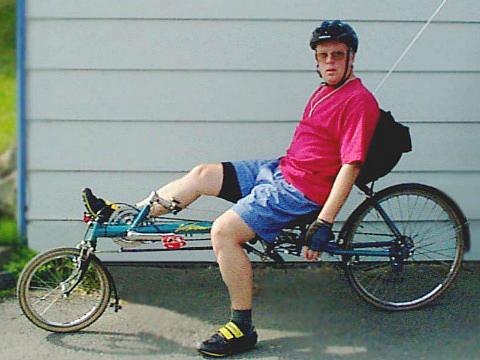 So I lightened the image,
softened the background, and cropped the image to focus on the subject.
So I lightened the image,
softened the background, and cropped the image to focus on the subject.
I then removed the white sack of sand behind the bike, the flower pot near the back wheel, and the kickstand attached to the real wheel hub. What type of klutz would have his picture taken on a bike with the kickstand down? I did this removal using Photoshop. I copied small sections of the photo over the top of the sections that I did not want using the cloning tool.
Did I say that I was overweight? I think not. Pictures don't lie. Not when you use Power Goo to move a segment of the image. You can move a segment, stretching the pixels in back of the area shifted and compressing them in front. That way, my stomach was nudged inward for a virtual tummy tuck. By the way, I really am loosing weight. I have gone to a nutritionist for dietary control of hypertension (high blood pressure). I am eating lots of fruit and veggies and by the time the ride starts, I should look like the modified picture.
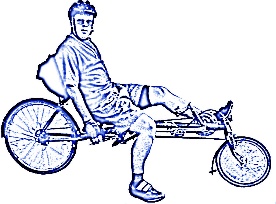 The next step was to remove all the
background by painting white everywhere except for myself and the bike. I then used
a digital technique that highlights the edges of the objects in the image. I Flipped
the image to create a mirror image, and processed the result with a "dual-tone"
process to create a two color image, blue and black. I use the result on my
letter-head and business cards associated with fund-raising for this ride.
The next step was to remove all the
background by painting white everywhere except for myself and the bike. I then used
a digital technique that highlights the edges of the objects in the image. I Flipped
the image to create a mirror image, and processed the result with a "dual-tone"
process to create a two color image, blue and black. I use the result on my
letter-head and business cards associated with fund-raising for this ride.
All pictures and text (c) 1998 by Bill Peterson, Anchorage, Alaska.